


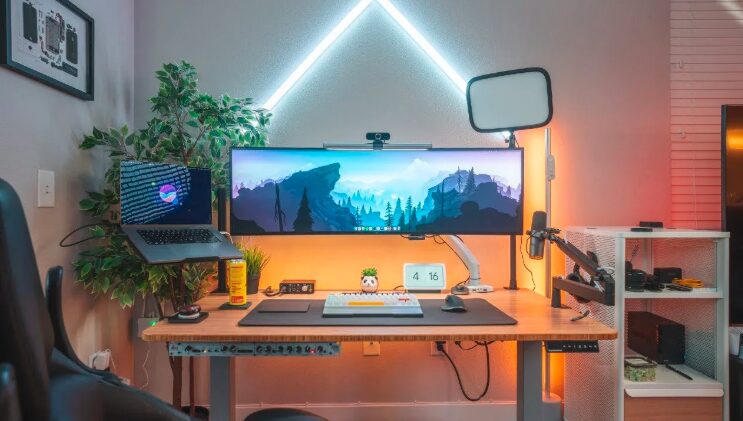
Working from home has become more common than ever, and having a productive home office setup is important for staying focused and organized. A well-designed workspace can improve concentration, reduce distractions, and increase comfort during long working hours. Whether you work remotely full-time or occasionally, creating the right office environment can make a big difference in your daily productivity and overall work experience.
Choose the Right Location
The first step in creating a productive home office is selecting the right location. A quiet area with minimal distractions helps improve focus and work efficiency.
If possible, choose a separate room dedicated to work. However, if space is limited, even a small corner in the bedroom or living room can work well when organized properly. The key is to create a space that feels professional and comfortable.
Invest in an Ergonomic Chair
A comfortable chair is one of the most important parts of a productive home office. Sitting for long hours in an uncomfortable chair can lead to back pain, neck strain, and poor posture.
An ergonomic chair provides proper support and helps maintain good posture throughout the day. Features to look for include:
- Adjustable height
- Lumbar support
- Comfortable cushioning
- Adjustable armrests
- Breathable material
A quality chair not only improves comfort but also helps increase focus and productivity.
Use a Spacious Desk
Your desk should provide enough space for your computer, documents, and work essentials without feeling cluttered. A clean and organized desk helps improve concentration and reduces stress.

Popular desk options include:
| Desk Type | Best For |
|---|---|
| Standing Desk | Better posture and movement |
| Corner Desk | Small rooms |
| Minimalist Desk | Clean modern setups |
| Adjustable Desk | Flexible working positions |
Choosing the right desk depends on your work style and available space.
Improve Lighting
Good lighting is essential for productivity and eye comfort. Natural light is the best option because it helps reduce eye strain and improves mood.
Place your desk near a window if possible. For evening work, use proper desk lamps with soft white lighting to create a comfortable workspace. Avoid overly dark or harsh lighting that can cause fatigue.
Keep Your Workspace Organized
A cluttered workspace can reduce productivity and create distractions. Organizing your office helps maintain focus and creates a more professional environment.
Simple organization ideas include:
- Cable management systems
- Drawer organizers
- Wall shelves
- Storage boxes
- File holders
Keeping only essential items on your desk can help create a cleaner and more productive workspace.
Add Proper Technology and Equipment
Reliable technology is important for efficient work. Slow devices or poor internet connections can waste time and reduce productivity.
Essential home office equipment may include:
- Fast computer or laptop
- High-speed internet connection
- External monitor
- Wireless keyboard and mouse
- Noise-canceling headphones
- Webcam for meetings
Investing in quality equipment can make remote work smoother and more comfortable.
Use Dual Monitors for Better Efficiency
Many professionals use dual monitors to improve multitasking and workflow efficiency. Having two screens allows you to work on multiple tasks without constantly switching windows.
Dual monitors are especially useful for:
- Graphic design
- Video editing
- Programming
- Research work
- Financial analysis
This setup can save time and improve overall productivity.
Add Plants and Personal Touches
A workspace should feel motivating and comfortable. Adding plants, artwork, or small decorations can improve mood and reduce stress.
Indoor plants also help improve air quality and create a more refreshing environment. Popular office plants include:
- Snake plants
- Pothos
- Peace lilies
- Succulents
Small personal touches can make your office feel more inviting without creating distractions.
Reduce Noise and Distractions
Noise can significantly affect concentration and work performance. If your home environment is noisy, consider using noise-canceling headphones or soundproofing solutions.
You can also improve focus by:
- Setting work hours
- Keeping your phone away during tasks
- Using productivity apps
- Informing family members about your schedule
A quiet and distraction-free environment helps maintain better focus throughout the day.
Maintain Proper Cable Management
Messy cables can make a workspace look unorganized and stressful. Cable management systems help keep cords neat and improve the appearance of your office.
Useful cable management tools include:
- Cable clips
- Cable sleeves
- Under-desk trays
- Wireless devices
A cleaner setup creates a more professional and comfortable work environment.
Create a Productive Routine
Even the best office setup will not improve productivity without proper routines and habits. Establishing a daily work schedule helps maintain discipline and focus.
Helpful productivity habits include:
- Starting work at the same time daily
- Taking short breaks
- Setting task priorities
- Avoiding unnecessary distractions
- Keeping a healthy work-life balance
Combining a well-designed workspace with strong routines leads to better long-term productivity.
Conclusion
Creating the best home office setup for productivity involves combining comfort, organization, and functionality. Choosing the right furniture, improving lighting, reducing distractions, and using reliable technology can greatly improve your work performance and daily comfort. Even small upgrades like better organization, ergonomic seating, and proper lighting can make a significant difference. With the right setup, your home office can become a productive and motivating space that supports both efficiency and well-being.